
The transformation of information acquisition methods
In the internet era, when we want to find information, the first tool that usually comes to mind is Google. Whether it’s searching for the latest news, recipes, or product reviews, Google can provide a vast amount of results within seconds. However, with advancements in artificial intelligence technology, generative AI models like ChatGPT and Perplexity are gradually changing the way we acquire information. How do these two methods differ? How should we choose the right tool?
Problems encountered when searching with Google
In daily life and work, we often "Google it" to obtain information. When we enter keywords, Google searches the web for relevant pages and ranks them using its algorithm to present the most likely relevant content. However, this search method may come with some challenges:
- Information Overload: Search results may contain millions of entries, requiring significant time to filter useful information.
- Ads and SEO Influence: Many websites optimize content to rank higher, leading to search results filled with ads or irrelevant information.
- Outdated or One-Sided Information: Google cannot instantly integrate multiple sources, sometimes providing outdated or biased answers.
- Scattered Key Information: Users must read multiple websites and compare different viewpoints to obtain a comprehensive answer.
Google's advantage lies in its ability to provide comprehensive information. However, it does not directly answer questions but instead offers sources for users to evaluate on their own.
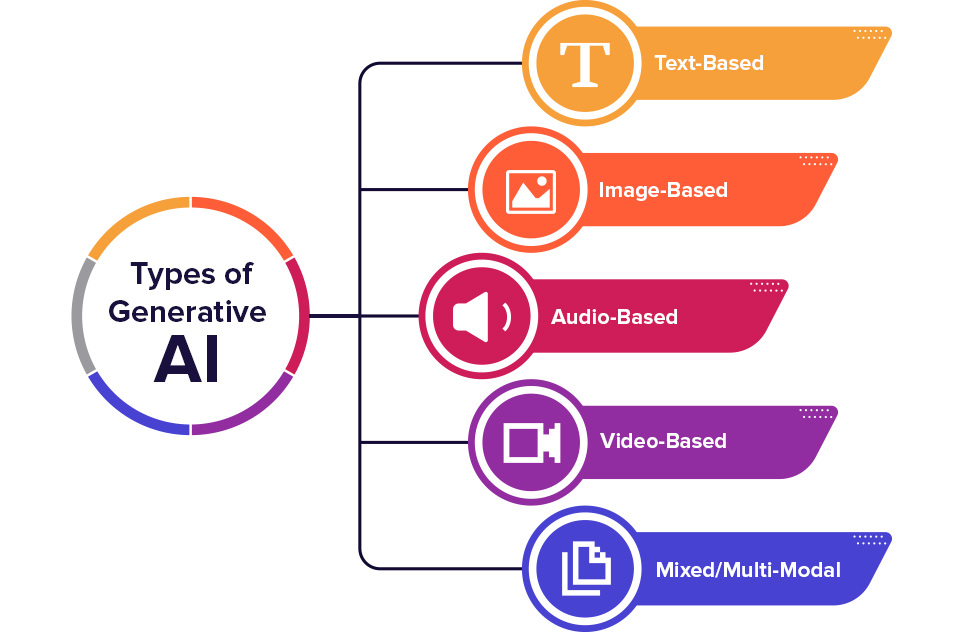
Generative AI: Direct Answers
Compared to traditional search engines, generative AI offers a more efficient way to acquire knowledge. Tools like ChatGPT and Perplexity can directly respond to queries with concise, synthesized answers. When using these AI models, the experience differs in several ways:
- Conversational Querying
Unlike search engines like Google, which require users to enter keywords and click on links, AI responds in a conversational manner. For example, asking "How to make a butter cake?" will prompt the AI to provide a complete step-by-step guide instead of listing multiple websites. - Information Integration
Generative AI automatically compiles and organizes information based on vast training data, eliminating the need for users to manually search and compare sources. - Customized Response
AI can understand the context of the question and provide answers that better meet the needs. For example, you can follow up with: "What if there is no cake flour?" and AI can immediately provide an alternative solution.
For example, with Perplexity:
⇒ Features include combining search and AI question-answering, allowing in-depth analysis of queries, selecting the most relevant content from a vast amount of web pages, and presenting summarized results.
⇒ Advantages include filtering out irrelevant information, saving search time, providing reliable sources, and reducing AI hallucinations.
Is ChatGPT different from Perplexity?
ChatGPT and Perplexity have some key differences at their core, mainly in terms of technical architecture, design goals, and user experience:
- Technical Architecture
⇒ ChatGPT (developed by OpenAI) is an AI assistant based on the GPT (Generative Pre-trained Transformer) model, primarily relying on the pre-trained knowledge of the language model (LLM) to answer questions, and it can obtain the latest information through tools (such as web search).
⇒ Perplexity, on the other hand, focuses more on real-time website retrieval. It has built-in powerful search capabilities, combined with AI models to provide answers, usually including source links, similar to an AI-enhanced search engine. - User Experience
⇒ ChatGPT tends to provide complete and fluent answers, making it suitable for applications like creative writing, professional consultation, and code generation. It also supports ongoing conversations, maintaining contextual understanding.
⇒ Perplexity is more like an AI-driven search engine, emphasizing accuracy and immediacy, making it ideal for finding new information or verifying certain facts. - Use Cases
⇒ ChatGPT is more suitable for in-depth conversations, creative writing, code development, or technical consulting.
⇒ Perplexity excels in quickly obtaining the latest information, verifying data, or providing answers with sources. - Work and Learning
⇒ ChatGPT can be used for writing reports, summarizing meeting notes, generating academic papers, and more.
⇒ Perplexity can be used to find relevant academic research and quickly obtain key data.
How to provide a prompt to Generative AI?
To effectively use these generative AI tools, the key lies in designing a good prompt (instruction). Here, we organize the principles of "clarity and specificity," "providing context," and "requesting format," along with examples of "precise" and "vague" prompts, suitable for ChatGPT and Perplexity:
- Clarity and Specificity
✅ "Please summarize the latest trends in artificial intelligence for 2025, focusing on the development of large models, AI applications in healthcare and finance, and the latest AI regulations."
❌ "What are the trends in AI?" (The question is too vague, and AI cannot provide a precise answer.)
📌 Tip: Add time, domain, and key points to help AI generate more relevant and tailored responses. - Providing Context
✅ "Assume I am the marketing manager of an e-commerce company. Please help me write a 2025 digital marketing trends report, focusing on SEO, social media advertising, and AI applications in marketing."
❌ "Tell me the digital marketing trends for 2025." (Lacks context, and AI cannot provide the best advice for a specific industry or role.)
📌 Tip: Add a description like "Assume I am [XX role]" to help AI tailor the response to your specific needs. - Requesting Format
✅ "Please list the 5 most common mistakes for Python beginners in bullet points, and provide an example code and solution for each mistake."
❌ "What are the common mistakes Python beginners make?" (Lacks clear format, and AI may provide a disorganized or hard-to-read response.)
📌 Tip: Clearly specify the output format (such as bullet points, tables, or step-by-step instructions) to help AI generate more readable content.
When to use Google? When to use AI?
From Google search to generative AI, the way we access information is changing. Traditional search engines provide raw data, allowing users to make their own judgments, while AI acts more like an intelligent assistant, organizing and providing direct answers.
- Using Google Search: When you need the latest news, official documents, shopping information, or diverse viewpoints, Google is more suitable.
- Using AI Tools: When you need quick, comprehensive answers, to learn new knowledge, for writing assistance, or to solve simple problems, generative AI is more convenient.
Finally, here are two important things to keep in mind when using AI:
⚠️ Never share private information with AI!
⚠️ Latest information ≠ Correct information!
—
The content is organized from online sources.
#SearchEngine #ArtificialIntelligence #AI #Google